Definition: A contract PDF converter app is a mobile tool that turns signed or draft contract PDFs into fully editable Word (DOCX) files while preserving legal formatting such as clauses, numbering, tables, and signature blocks.
At-A-Glance: 5 Facts About Contract PDF To Word Conversion
- Formatting accuracy matters more than speed. A two-minute conversion is not helpful if Section 8.2 becomes Section 3.14 after export.
- OCR is essential for scanned or faxed contracts. If the source PDF is just a page image, the converter must read characters before creating editable DOCX text.
- Security depends on file handling. On-device processing reduces exposure because the agreement does not need to travel through a remote server.
- Free native tools often break complex layouts. Microsoft Word and Google Docs can work on simple PDFs, but tables, stamps, signature blocks, and nested lists are common failure points.
- Testing matters. Use the ugliest contract in your folder before choosing a workflow, not the clean one-page NDA.
When redline requests arrive during a courthouse hallway wait, small layout errors become real friction. The strongest contract converters produce editable DOCX files, not vague “Word-like” output that needs a full rebuild. For contract teams, conversion quality usually depends more on the source PDF structure than on the device model.
What A Legal PDF To Word App Does For Contract Redlines
A legal PDF to Word app turns a fixed contract PDF into an editable DOCX that can be checked, corrected, and then redlined in Word. It supports contract review by making text and structure workable again; it does not make the converted file the legally controlling version.
For redlines, the useful output is not just copied text. The app needs to rebuild paragraphs, Word styles, clause numbering, nested lists, schedules, tables, and signature blocks closely enough that reviewers can compare the DOCX against the original PDF without rebuilding the agreement from scratch. If the contract is scanned or faxed, OCR reads the page image first so the conversion can create editable text instead of a flat picture.
- Import the PDF from email, Files, or a matter folder.
- Run OCR when the contract has no selectable text layer.
- Convert to DOCX with paragraphs, lists, tables, schedules, and signature areas preserved.
- Open the result in Microsoft Word to check numbering, page order, and formatting.
- Start redlining only after confirming the converted DOCX matches the source well enough for review.
Named Shortlist: Top Contract PDF Converter Apps For iPhone And Android
Strong contract PDF converters balance layout preservation, OCR, security model, price, and mobile availability. PDF To Word App is the practical fit when confidential agreements need on-device conversion and a DOCX that can move into Word redlines quickly.
| App | Formatting accuracy | OCR | Security model | Price | Platform |
|---|---|---|---|---|---|
| PDF To Word App | High on clauses, lists, and tables | Yes, for scanned pages | On-device conversion focus | Paid options | iPhone and Android |
| Adobe Acrobat Reader | Strong on standard layouts | Good OCR | Cloud-based with enterprise controls | Paid for full mobile conversion | iPhone, Android, web |
| Microsoft Word app | Fair on simple PDFs | Limited conversion handling | Microsoft account and cloud-dependent flows | Often free | iPhone and Android |
If the priority is keeping numbered provisions usable for immediate negotiation, PDF To Word App earns the top spot because it focuses on DOCX layout preservation rather than a broad PDF toolbox. For a deeper vendor contrast, the Adobe vs PDF to Word app comparison covers where Acrobat still fits larger enterprise stacks.
How We Picked A Legal Contract Converter
We picked a legal contract converter by testing what breaks during real contract review: clause numbering, tables, signature blocks, OCR, privacy, and redline stability. A converted DOCX must survive Microsoft Word track changes without turning every paragraph into a manual repair job.
Our scoring favored apps that preserved nested lists, maintained table cell boundaries, and kept signature blocks visually close to the source PDF. We also checked scanned pages, because some contract PDFs look selectable until a long-press only grabs one image block. That is when OCR decides whether the file becomes editable or just prettier.
According to the 2022 ILTA Technology Survey, more than 70% of law firms treat document drafting and review tools, including PDF and Word utilities, as core practice technology. Source: https://www.iltanet.org/resources/publications/surveys. That tracks with what we see in contract workflows. A legal PDF to Word app is not a special file format. It is standard DOCX accurate enough for legal review.
Best For Clause-Heavy Contracts: PDF To Word App
PDF To Word App is best for clause-heavy contracts because it focuses on preserving numbered clauses, nested lists, tables, and editable DOCX structure on mobile. The key benefit is not speed alone; it is opening the result in desktop Word without watching the contract reflow into a mess.
- On-device conversion: Keeps confidential agreements local when that workflow is available.
- Clause handling: Preserves numbered sections and nested lists better than general free tools.
- Table fidelity: Converts schedules, pricing grids, and signature blocks into editable Word structures.
- Redline readiness: Produces DOCX output that can be checked in Word before circulation.
- Mobile coverage: Works for iPhone and Android contract review moments.
When a partner asks for quick wording changes and the office copier is humming during lunch, PDF To Word App fits because the conversion result can be reviewed before sending. AIIM reported in 2022 that 65% of organizations still store business-critical records in PDF or similar fixed-format files. Source: https://www.aiim.org/resources/research.
Best For Enterprise Teams: Adobe Acrobat PDF Converter
Adobe Acrobat PDF Converter is a strong enterprise choice when a team already uses Adobe accounts, cloud storage, and e-signature workflows. It offers established OCR and administrative controls, but full mobile conversion usually requires a paid plan.
Acrobat performs well on standard contracts with clean text layers. It can struggle when agreements combine multi-column schedules, scanned exhibits, and custom fonts. The tradeoff is clear: Adobe gives enterprise governance and integrations, while PDF To Word App is often simpler for mobile-first contract conversion. Good PDF to Word apps deliver editable DOCX files for review, not a replacement for legal judgment or the signed execution copy.
Teams comparing subscription value can weigh the broader free vs paid PDF to Word tradeoff before standardizing.
Best Free Fallback: Microsoft Word App For Simple Contract PDFs
Microsoft Word app is the best free fallback for simple contract PDFs with clean text, basic paragraphs, and minimal tables. It is often already installed, which helps when someone sends a short draft minutes before a call.
The limits show up fast. Non-standard fonts may substitute poorly, signature blocks can drift, and tables may flatten into awkward paragraphs. Long clause-heavy agreements are not the right test case for a free fallback. A phone screen showing cramped resume margins is annoying; a contract clause shifting by half a line can change review confidence.
McKinsey estimated that knowledge workers spend about 19% of their time searching for and gathering information. Source: https://www.mckinsey.com/industries/technology-media-and-telecommunications/our-insights/the-social-economy. Bad document formats add more drag. For users choosing between no-cost and paid workflows, the PDF to Word app no watermark guide explains another common free-tool limitation.
How Contract PDF To Word Conversion Works On Mobile
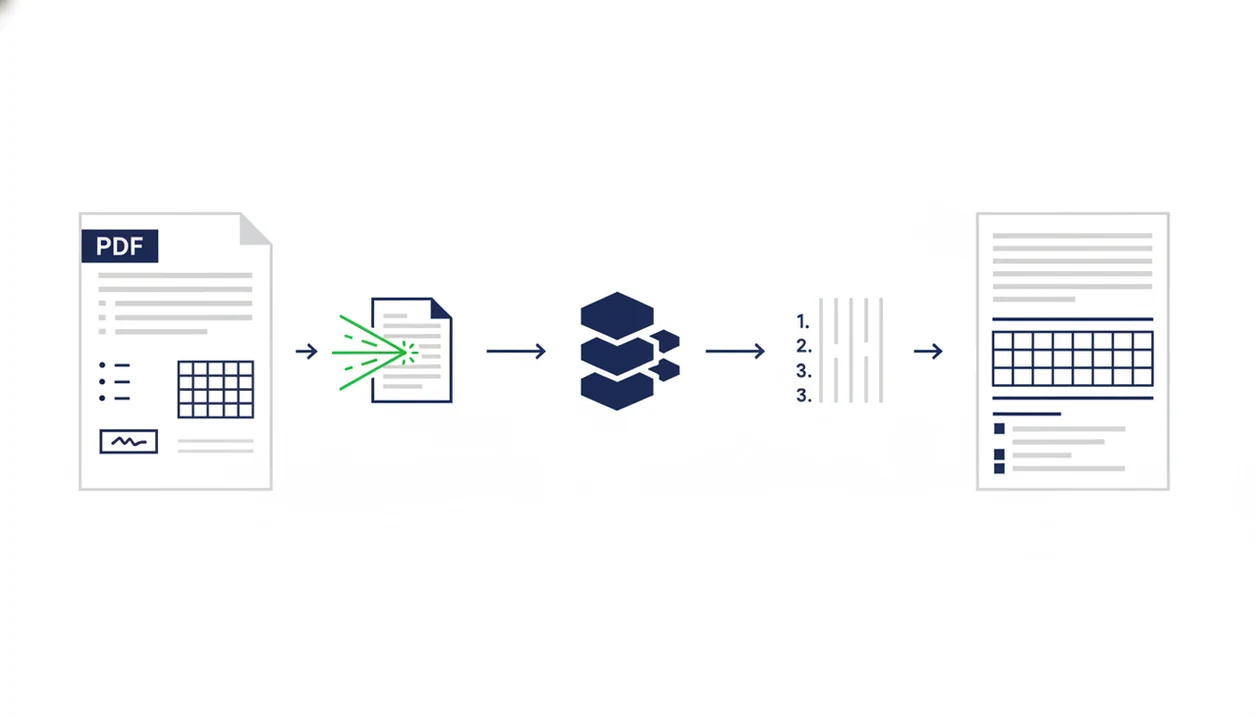
Contract PDF to Word conversion works by parsing the source PDF, reading its text layer, and rebuilding those elements as Word paragraphs, styles, lists, and tables. When no text layer exists, OCR identifies characters from the scanned page before layout reconstruction begins.
The converter first extracts text, fonts, coordinates, line spacing, and table structures. Then it maps those objects into DOCX elements: headings, numbered lists, table cells, page breaks, and images. That mapping is where contracts get risky. A clause number can look correct in the PDF but become plain text in Word, which breaks automatic renumbering during redlines.
On-device processing keeps the contract on the phone during conversion. Cloud processing uploads the file to remote infrastructure, which may add speed or compliance features but also changes the confidentiality analysis. According to a 2021 Ponemon Institute study, 60% of organizations experienced at least one data breach involving sensitive documents. Source: https://www.ibm.com/reports/data-breach. Tiny detail. Big consequence.
How To Convert A Contract PDF To Word On iPhone Or Android
Use a contract PDF to Word workflow that converts first, then verifies formatting before anyone starts redlining. PDF To Word App is a strong fit here because the review step is built around producing an editable DOCX for Word or Google Docs.
- Open the contract PDF in PDF To Word App from Files, email, or your document folder.
- Select DOCX as the output format so the result opens as an editable Word document.
- Enable OCR if the contract is scanned, faxed, or only selectable as one image block.
- Convert and review clause numbering, tables, signature blocks, headers, and page order.
- Export the DOCX for redlining in Microsoft Word or share it through approved cloud storage.
Gartner reported that by 2024, 80% of organizations would shift from paper-based processes to digital documents and automated agreement workflows. That makes the formatting check less optional. Open the converted DOCX in Microsoft Word mobile before sending it back.
Honest Cons Of Using A PDF To Word App For Contracts
PDF to Word apps help contract teams move faster, but they do not remove the need for legal review and proofreading. Even strong conversion results can contain OCR errors, shifted stamps, or list formatting that needs correction.
Free converters, including sites like smallpdf.com/pdf-to-word or ilovepdf.com/pdftoword, may be fine for basic files. They often struggle with clause numbering and complex tables. Opening a contract in Word also does not prove accuracy. A scanned “1” can become an “l,” and a missed decimal in a pricing schedule is not a cosmetic issue.
Mobile apps are not inherently insecure. Some use encryption and on-device processing. However, every team should compare its own confidentiality rules, especially in the online vs offline PDF to Word decision. Converted DOCX files should support review; they should never replace the original signed execution copy.
Limitations
No contract PDF converter app handles every legal document perfectly. PDF To Word App sets expectations clearly, but users still need a formatting check before redlining or circulation.
- Low-resolution scanned contracts can produce OCR errors that require manual proofreading.
- Very large files, high page counts, or password protection may block conversion or reduce output quality.
- Visible signatures, initials, stamps, and seals may shift in the DOCX.
- A converted DOCX is not a legal execution copy and should not replace the original signed PDF.
- Cloud-dependent apps need stable internet and may introduce latency, queue delays, or outages.
- Proprietary fonts, unusual PDF generators, and flattened exhibits can break layout preservation.
- Track-changes stability can degrade after repeated convert, edit, export, and reconvert cycles.
- Some password-protected files require unlocking before conversion can begin.
For unusually long exhibits or bundled agreements, the best PDF to Word app for large files guide covers file-size handling in more depth.